
FROM OUR BLOG
Clownfish Voice Changer: The Complete Guide for 2026
Apr 28, 2026

⚡ Quick Answer
Clownfish Voice Changer is a free, system-level real-time voice changer for Windows that modifies your microphone input across every application simultaneously — Discord, Skype, Steam, TeamSpeak, and more. It offers 14 built-in voice effects (robot, alien, helium, pitch shift, gender swap), a built-in soundboard, text-to-speech, and VST plugin support. Installation takes under two minutes; setup requires three steps: install the app, select your microphone under System Integration, then right-click the tray icon to pick a voice effect. It is Windows-only (Vista through 11) and entirely free.
What Is Clownfish Voice Changer?
Clownfish Voice Changer is a lightweight, free Windows application that intercepts your microphone signal at the operating system level before routing it to any app on your computer. Because it installs at the system level rather than inside a single application, it automatically applies to every program that uses your microphone — you configure it once, and it works everywhere.
Originally released as a simple pitch-shifter for gaming chat, Clownfish has evolved into a full-featured audio toolkit. Its current feature set includes:
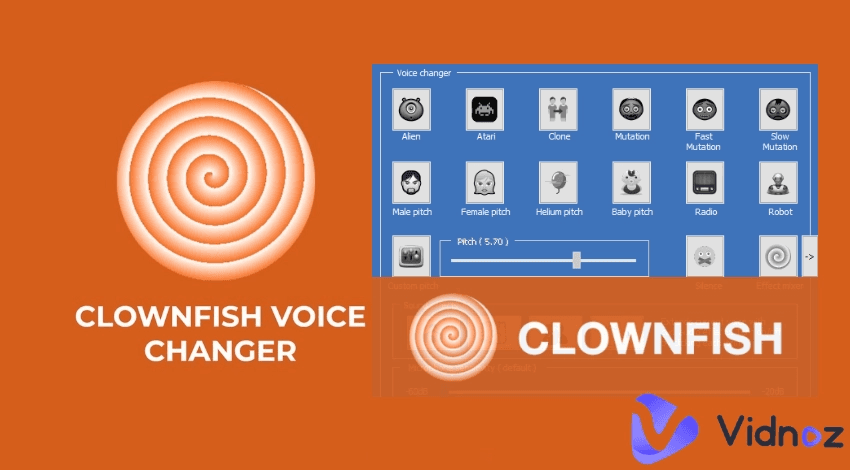
14 real-time voice effects — Alien, Atari, Baby Pitch, Clone, Custom Pitch, Female Pitch, Helium Pitch, Male Pitch, Mutation, Radio, Robot, and more
Built-in soundboard — play pre-recorded sound clips during any live call
Text-to-speech (TTS) — convert typed text to spoken audio in multiple voices and languages
VST plugin support — extend the effect library with third-party professional audio plugins
VCClient integration — connect AI voice conversion models for advanced real-time voice cloning (added in v1.90)
Chrome extension — a browser-only variant compatible with Google Meet, Zoom, and Discord web
It is compatible with Windows Vista, 7, 8, 8.1, 10, and 11 in both 32-bit and 64-bit versions. There is no Mac or Linux desktop version of the full app.
How to Install and Use Clownfish Voice Changer: Step-by-Step Guide
Follow these steps exactly to get Clownfish working correctly. The most common mistakes happen during microphone setup — read each step carefully.
Step 1 — Download Clownfish Go to the official site at clownfish-translator.com/voicechanger and download the version that matches your system: 64-bit for Windows 10/11, 32-bit for older versions. Avoid third-party download sites — only use the official URL to ensure you receive a clean, virus-free file.
Step 2 — Run the Installer Double-click the downloaded .exe file. The installation wizard will launch. Click Next through the prompts. You will notice Windows may temporarily shut down the audio endpoint builder — this is normal behavior. The installer needs to modify system audio routing. Restart your computer after installation completes.
Step 3 — Find Clownfish in Your System Tray Clownfish has no visible window after launch — this surprises most first-time users. Look in the bottom-right corner of your taskbar for the Clownfish fish icon. If you don't see it, click the upward arrow (^) to expand hidden tray icons. Right-click the Clownfish icon to access all controls.
Step 4 — Set Up Your Microphone Right-click the Clownfish icon → Setup → System Integration. A list of audio input devices will appear. Click the Install button next to your primary microphone. Then open Windows Sound Settings (right-click the speaker icon → Sounds → Recording tab), right-click your microphone, and select "Set as Default Device." This ensures Clownfish intercepts the correct input.
Step 5 — Enable Microphone Monitoring (Optional) Right-click the Clownfish icon → Hear Microphone. This lets you hear your own modified voice in real time through your headphones — useful for testing effects before going live.
Step 6 — Choose a Voice Effect Right-click the Clownfish icon → Set Voice Changer. A submenu lists all 14 built-in effects. Click any effect to apply it instantly. The effect is now active across every application using your microphone. To turn off effects entirely, select "None" from the same menu or double-click the tray icon to toggle Clownfish on and off.
Step 7 — Use the Soundboard Right-click the Clownfish icon → Soundboard. A panel opens where you can load .mp3, .wav, or .ogg audio files and assign them to keyboard shortcuts. During any call, press the assigned key to play that sound clip directly into your microphone channel.
Step 8 — Add VST Plugins (Advanced) Right-click the Clownfish icon → VST Effects → Add VST Effects. Download a VST plugin (the .dll file), copy it to C:\Program Files\Clownfish\vst, restart Clownfish, and enable the plugin from the VST Effects menu. This unlocks professional-grade audio effects beyond the built-in library.
How to Use Clownfish Voice Changer on Discord
Discord picks up any microphone set as the Windows default device. Since Clownfish installs at the system level, no extra configuration is needed inside Discord — once you follow Steps 4–6 above, Discord will automatically use your modified voice.
To verify it's working: open Discord → Settings (gear icon) → Voice & Video → Input Device. You should see your microphone listed. Speak into your mic while a friend listens on a call, or enable the "Input Sensitivity" test to see the audio level responding.
Common fix: if your voice isn't modified in Discord, go to Windows Sound Settings → Recording → right-click your mic → Properties → Enhancements tab → uncheck "Disable all enhancements." If there's no Enhancements tab, go to the Advanced tab and check "Enable audio enhancements."
Clownfish vs. Other Voice Changers: Quick Comparison
Feature | Clownfish | Voicemod | MorphVOX | VoiceStars |
|---|---|---|---|---|
Price | Free | Free / $48/yr | $40 one-time | Free+ |
Platform | Windows only | Win + Mac | Windows | Browser / any OS |
Real-time | Yes | Yes | Yes | No (studio) |
AI voices | Via VCClient | Yes (paid) | Limited | Yes (native) |
Celebrity voices | No | Limited | No | Yes |
VST plugins | Yes | No | Yes | No |
No install needed | No | No | No | Yes |
All 14 Clownfish Voice Effects Explained
Robot — Metallic, mechanical tone. Popular in gaming roleplay and sci-fi streams.
Alien — Distorted, extraterrestrial pitch with a tremolo-like quality.
Helium Pitch — High-pitched, chipmunk-style voice. Classic prank effect.
Baby Pitch — Softer, higher tone suggesting a younger voice.
Male Pitch — Shifts pitch downward for a deeper, more masculine sound.
Female Pitch — Shifts pitch upward toward a feminine register.
Radio — Adds a narrow-band EQ filter replicating a walkie-talkie transmission.
Clone — Doubles the voice with a slight pitch offset for a layered, choir-like sound.
Mutation — Combines pitch and resonance distortion for an otherworldly effect.
Fast Mutation — Mutation with rapid modulation applied.
Slow Mutation — Mutation with slower, more pronounced pitch sweeps.
Atari — 8-bit, retro video game audio aesthetic.
Custom Pitch — Fine-grained manual control from -15.0 to +15.0. Most versatile for dialing in a specific tone.
None — Passes through your voice unmodified. Use this to turn off effects without closing Clownfish.
Clownfish Voice Changer Not Working: Top Fixes
Voice is not modified Go to Sound Settings → Recording → right-click your microphone → Properties → Enhancements tab → uncheck "Disable all enhancements." If no Enhancements tab exists, go to the Advanced tab and enable "Enable audio enhancements."
Wrong microphone is being used Open System Integration in Clownfish and verify the correct microphone is installed. Then confirm the same microphone is set as Default Device in Windows Recording settings.
App is not visible after installation Clownfish runs silently in the system tray. Click the ^ arrow in the taskbar to expand hidden icons. The Clownfish fish logo will be there.
Application freezes or causes audio issues Right-click the tray icon → Setup → switch to a different installation mode → remove and reinstall the device. There are four modes; each handles audio routing differently depending on your system.
Custom sounds cannot be added Run Clownfish as Administrator (right-click the .exe → Run as administrator). Alternatively, manually paste sound files into C:\Program Files (x86)\ClownfishVoiceChanger\sounds\ and restart the application.
When Clownfish Is Not Enough: AI Voice Generation for Creators
Clownfish excels at one thing: modifying your live microphone input in real time. For gaming, prank calls, and Discord roleplay, it's hard to beat for the price. But it has clear limitations for content creators who need more:
No celebrity or character voice models — effects are generic pitch/distortion presets, not specific voice identities
Windows-only — no option for Mac, iOS, or Chromebook users
No studio-quality output — real-time effects introduce artifacts under certain microphone conditions
No premium text-to-speech — the built-in TTS is functional but basic
If your use case goes beyond live chat — if you're producing video content, building a podcast, creating AI-narrated clips, or experimenting with celebrity voice models — a dedicated AI voice platform covers territory that Clownfish was never designed for.
VoiceStars is a browser-based AI voice platform that focuses specifically on celebrity and character voice models. Unlike Clownfish, it requires no installation, works on any OS, and generates high-fidelity audio you can download and layer into any DAW or video editor. The two tools complement each other: use Clownfish for live real-time calls, use VoiceStars for produced, studio-ready content.
Frequently Asked Questions
What is Clownfish Voice Changer? Clownfish Voice Changer is a free, system-level real-time voice changer for Windows. It installs at the operating system level and modifies any application that uses a microphone — Discord, Skype, TeamSpeak, Steam, and more. It offers 14 built-in voice effects, a soundboard, text-to-speech, and VST plugin support.
Is Clownfish Voice Changer free? Yes, Clownfish Voice Changer is entirely free. There are no premium tiers, no paid upgrades, and no feature locks. The full application is available at no cost from the official website.
Is Clownfish Voice Changer safe? Clownfish is considered safe when downloaded from the official website (clownfish-translator.com). The installer temporarily interrupts the Windows audio service during setup — this is expected behavior, not malicious activity. Avoid third-party download sites.
Does Clownfish work on Mac? No. The full desktop version is Windows-only (Vista through 11). A Chrome extension version works on any OS in browser-based apps, but does not apply effects system-wide on Mac.
How do I use Clownfish on Discord? Install Clownfish, set your microphone under System Integration, set it as the Windows Default Recording Device, then select a voice effect via right-click → Set Voice Changer. Discord will automatically use your modified voice — no extra steps inside Discord are required.
How many voice effects does Clownfish have? Clownfish includes 14 built-in voice effects. Additional effects can be added via third-party VST plugins or by connecting the VCClient AI voice conversion system introduced in version 1.90.
Can I use Clownfish for streaming on Twitch or YouTube? Yes. Because Clownfish operates at the system level, it affects your microphone input in OBS, Streamlabs, and any streaming software. Your viewers will hear your modified voice. The soundboard lets you trigger audio clips live via keyboard shortcuts.
Why is my voice not changing in Clownfish? The most common cause is a Windows audio enhancement setting. Go to Sound Settings → Recording → right-click your microphone → Properties → Enhancements tab → uncheck "Disable all enhancements." Also verify the correct microphone is set as Default Device and that Clownfish is turned on.
Does Clownfish support AI voice changing? Since version 1.90, Clownfish supports VCClient as an external effect — a framework that enables AI-based real-time voice conversion using downloadable voice models from sources like voice-models.com or rvc-models.com.
What platforms work with Clownfish? Clownfish works with any Windows application that uses a microphone: Discord, Skype, Hangouts, Viber, Ekiga, Jitsi, Ventrilo, TeamSpeak, Mumble, Steam, and more. It also integrates with recording software like Audacity and Adobe Audition.
Is there a Clownfish Voice Changer for Android or iOS? There is no official mobile app from the original Clownfish developers. Apps using the Clownfish name on mobile stores are unaffiliated third-party applications.
What is the difference between Clownfish and Voicemod? Both are free real-time voice changers for Windows but differ in scope. Clownfish is lightweight, entirely free, and focused on simple effects. Voicemod offers a larger library and AI voice options but requires a paid subscription for full access. For pre-produced audio with celebrity voices, neither compares to dedicated AI platforms like VoiceStars.
Conclusion
Clownfish Voice Changer remains one of the best free tools for real-time voice modification on Windows in 2026. Its system-level installation, zero cost, and universal compatibility make it a genuine first choice for gamers, streamers, and anyone who wants to add a fun layer to live voice communication.
For live calls and gaming: install Clownfish, follow the 8-step guide above, and you'll be live with a modified voice in under five minutes. For produced content where you need a specific celebrity voice, browser compatibility, or studio-quality output without any installation, VoiceStars is the natural complement.
Related Readings


import StickyCTA from "https://framer.com/m/StickyCTA-oTce.js@Ywd2H0KGFiYPQhkS5HUJ"