
How to Make AI Music for TikTok and YouTube: Create, Label, Post (6 Steps)
Published: · Updated:
Need a track for your next video? Brief the Voicestars AI Song Generator with genre, mood and length.
AI song generators can produce a custom track for every video, but the questions creators ask are practical: which version fits a short video, and what do YouTube and TikTok expect you to label?
This guide covers six steps from brief to upload, with the disclosure rules as YouTube and TikTok publish them.
We reviewed YouTube’s GenAI disclosure help page and March 2024 announcement, TikTok’s September 2023 AI-label announcement and the Voicestars AI Song Generator on 12 November 2026.
The answer in brief
Brief an AI song generator with genre, mood, BPM and length, keep the take with the strongest first 15 seconds, and cut 15-, 30- and 60-second edits with short fades. On YouTube, answer Yes to AI use when AI music is the main focus; on TikTok, label realistic AI audio with the AI-generated content setting. Check the plan’s commercial terms before releasing.
- 01 Brief Genre, mood, BPM, length
- 02 Edit 15, 30 and 60 s cuts
- 03 Label AI use on upload
AI disclosure on each platform
Rules as published on the dates in the sources; check them again before a release.
| Platform | When to label AI music | Where to set it |
|---|---|---|
| YouTube | AI-generated music that is the main focus of the video; realistic voices of real people | Upload → AI use → Yes (YouTube Studio) |
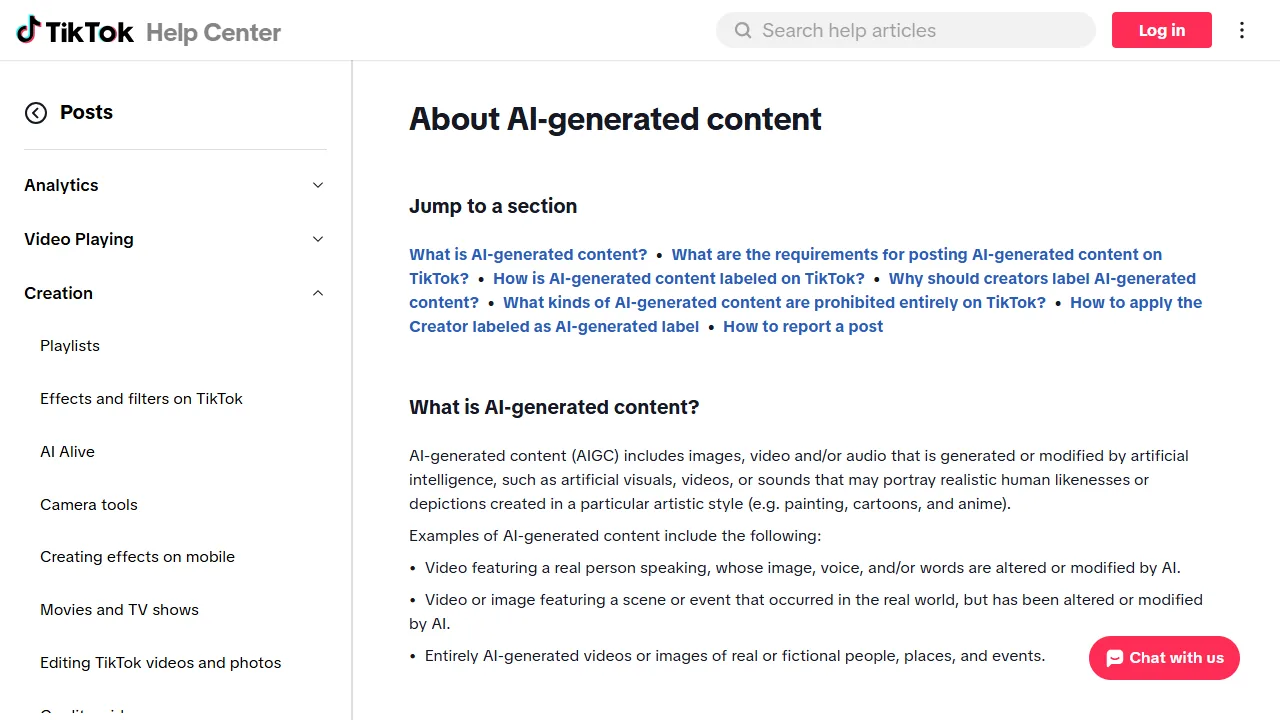
| TikTok | Realistic AI images, audio or video, under its synthetic-media policy | AI-generated content label when posting (More options) |
| Streaming services | Depends on distributor and service rules | Your distributor’s release form |
The Voicestars AI Song Generator creates songs with vocals or instrumentals from a prompt or your lyrics.
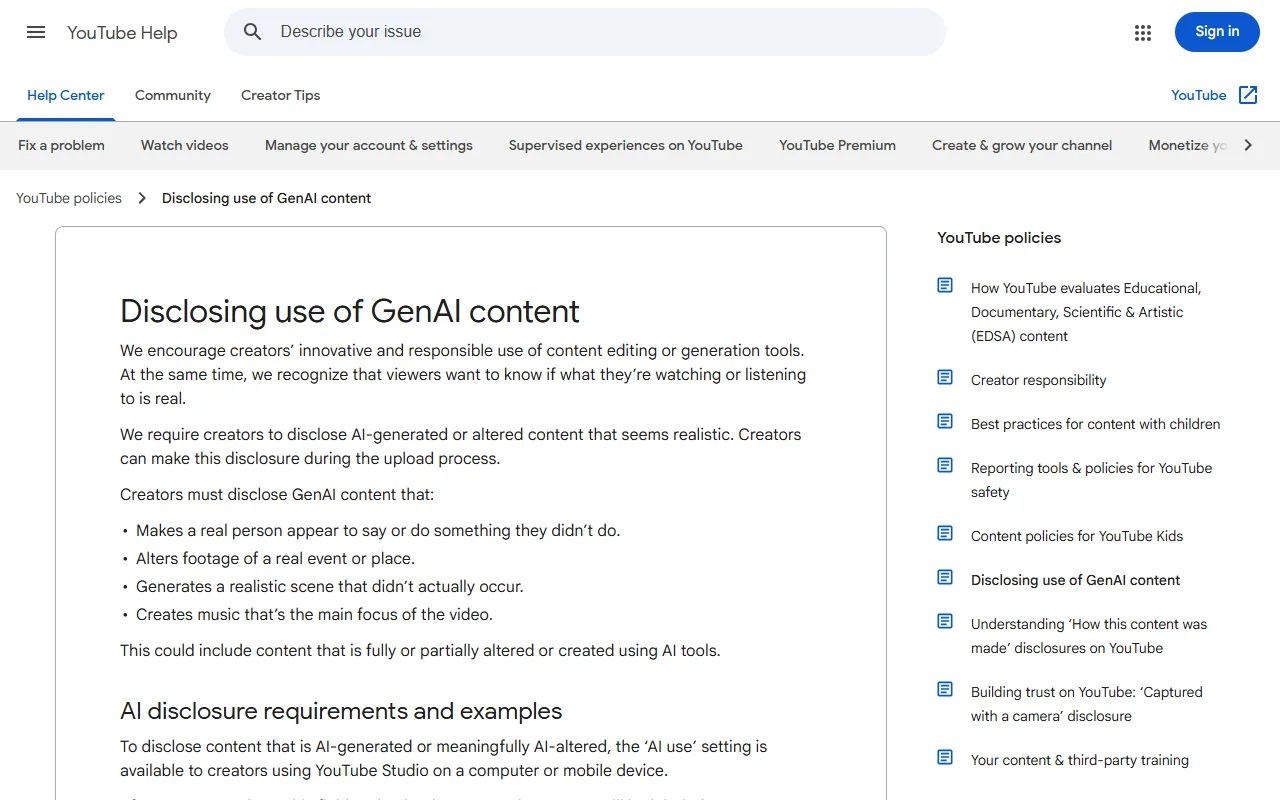
Sources: YouTube Help: Disclosing use of GenAI content · YouTube Official Blog: How we’re helping creators disclose altered or synthetic content (18 March 2024) · TikTok Newsroom: New labels for disclosing AI-generated content (19 September 2023)
Make and publish an AI track in 6 steps
Step 5 contains the exact disclosure settings.
- Write a one-line brief per video: genre, mood, BPM, length in seconds and whether you need vocals; for TikTok, put the hook in the first 3 seconds of the track.
- Generate two or three takes in an AI song generator and keep the one whose first 15 seconds work on their own, since short videos rarely use the full track.
- Cut a 15-, 30- and 60-second version with a clean ending, and fade the last 0.5 seconds so loops do not click.
- Check loudness before upload: platforms normalise playback, so aim for consistent levels rather than maximum loudness, and keep peaks below −1 dBFS.
- On YouTube, answer Yes to AI use during upload when AI-generated music is the main focus; on TikTok, turn on the AI-generated content label in More options when the content is realistic AI audio or video.
- Before releasing on streaming services, read your AI plan’s commercial terms, keep the prompt and generation date, and never imitate a real artist’s voice or name.
Example: one brief, three cuts
An original brief and the edit plan we suggest for a cooking channel.
Brief: upbeat acoustic pop, 112 BPM, warm and playful, no vocals, 90 seconds, bright hook in the first 3 seconds
Cut 1: 0:00–0:15 for TikTok and Shorts
Cut 2: 0:00–0:30 for Reels and intros
Cut 3: 0:00–1:00 for long-form background, fade at 0:59.5
Records kept: prompt, generation date, plan name
What to check
- The hook comes first.
- Every cut ends on a fade.
- Generation records are saved with the files.
What YouTube’s rules say about AI music
YouTube’s help page, read on 12 November 2026, lists creating music that is the main focus of the video among the cases that require disclosure, along with making a real person appear to say something they did not.
The same page says production help such as AI for scripts, titles or thumbnails does not require disclosure, and neither does cloning your own voice for voiceovers.
YouTube announced the disclosure tool on 18 March 2024 and says labels appear in the expanded description or on the player.
To compare generators first, read our best AI music generator guide.
Fix common AI track problems
| Symptom | Likely cause | What to do |
|---|---|---|
| Content ID claim on your AI track | Generated melody resembles existing music | Dispute with your generation records or regenerate. |
| Track starts slowly in a short video | Intro longer than 3 seconds | Cut to the hook or use a later section. |
| Click when the video loops | Hard cut at the end | Fade the last 0.5 seconds. |
| YouTube added an AI label | No disclosure at upload | Answer the AI-use question yourself on upload. |
Generate a song with vocals on Voicestars
Describe the song, add lyrics if you have them, and change the singer afterwards if you want.
- Describe genre, mood and tempo in the AI Song Generator.
- Paste your lyrics or let the generator write them.
- Keep the best take and convert the vocal with a singer voice if needed.
Adding a voiceover too? See our TikTok voice generator guide.
Points to watch
Platform rules change; we quote the pages as they read on 12 November 2026.
Each streaming distributor sets its own AI policy, so check yours before uploading.
How we checked this guide
Tested and written by Big Jeezy, music producer, on 12 November 2026, using Voicestars and the tools named in this guide.
- YouTube’s GenAI disclosure help page and March 2024 announcement, TikTok’s September 2023 AI-label announcement and the Voicestars AI Song Generator reviewed 12 November 2026; screenshots captured that day.
- Rules checked on 12 November 2026: YouTube’s help page listed AI-generated music that is the main focus of a video among content to disclose (screenshot below); TikTok’s newsroom post dated 19 September 2023 described the AI-generated content label.
Screenshots and examples come from these sessions. Voicestars publishes this guide and sells the voice tools it mentions.
Report a correction to Voicestars Editorial with the page, date, a short reproducible example and the observed result. Avoid sending private recordings. See our editorial policy.
Common questions
Can I use AI-generated music on YouTube?
Yes, but YouTube’s help page lists AI-generated music that is the main focus of a video as content to disclose. During upload in YouTube Studio, answer Yes to the AI-use question. YouTube shows the label in the description or on the player and may add one itself.
Do I need to label AI music on TikTok?
TikTok launched a creator label for AI-generated content on 19 September 2023 and requires labels for realistic AI images, audio or video. An original instrumental is rarely “realistic” in that sense, but AI vocals that sound like a real singer should be labelled.
Is AI music copyright-free for TikTok and YouTube?
Not automatically. Your rights come from the generator’s terms: some free plans are for non-commercial use only, while paid plans grant commercial use. Content ID claims can also hit tracks that resemble existing music, so keep your prompt and generation date as records.
How long should an AI track for TikTok be?
Make the full track, then cut 15-, 30- and 60-second edits. The first three seconds carry the hook for short videos, so choose the take whose opening works on its own rather than the one with the best ending.
Can I upload AI songs to Spotify?
Distributors decide what they accept and ask you to confirm you own the rights. Read the AI plan’s commercial terms, avoid voices or names that imitate real artists, and keep proof of how the track was made in case a service asks.
Will labelling my video as AI reduce its reach?
Platforms describe labels as transparency tools rather than penalties. TikTok’s announcement presented the label as a way to inform viewers, and YouTube says disclosure appears as a label. Removing or hiding required disclosure is what puts content at risk.
Sources we used
Checked on 12 November 2026.
Read YouTube’s GenAI disclosure rules and TikTok’s AI-generated content labels.


